Rating Charts
Rating charts are currently in preview. We are still refining the data processing and visualization. If you encounter any issues, please reach out to us.
Rating charts provide a powerful way to visualize your app's performance over time. By analyzing trends in ratings and volume, you can identify the impact of new releases, marketing campaigns, or service interruptions on user satisfaction.
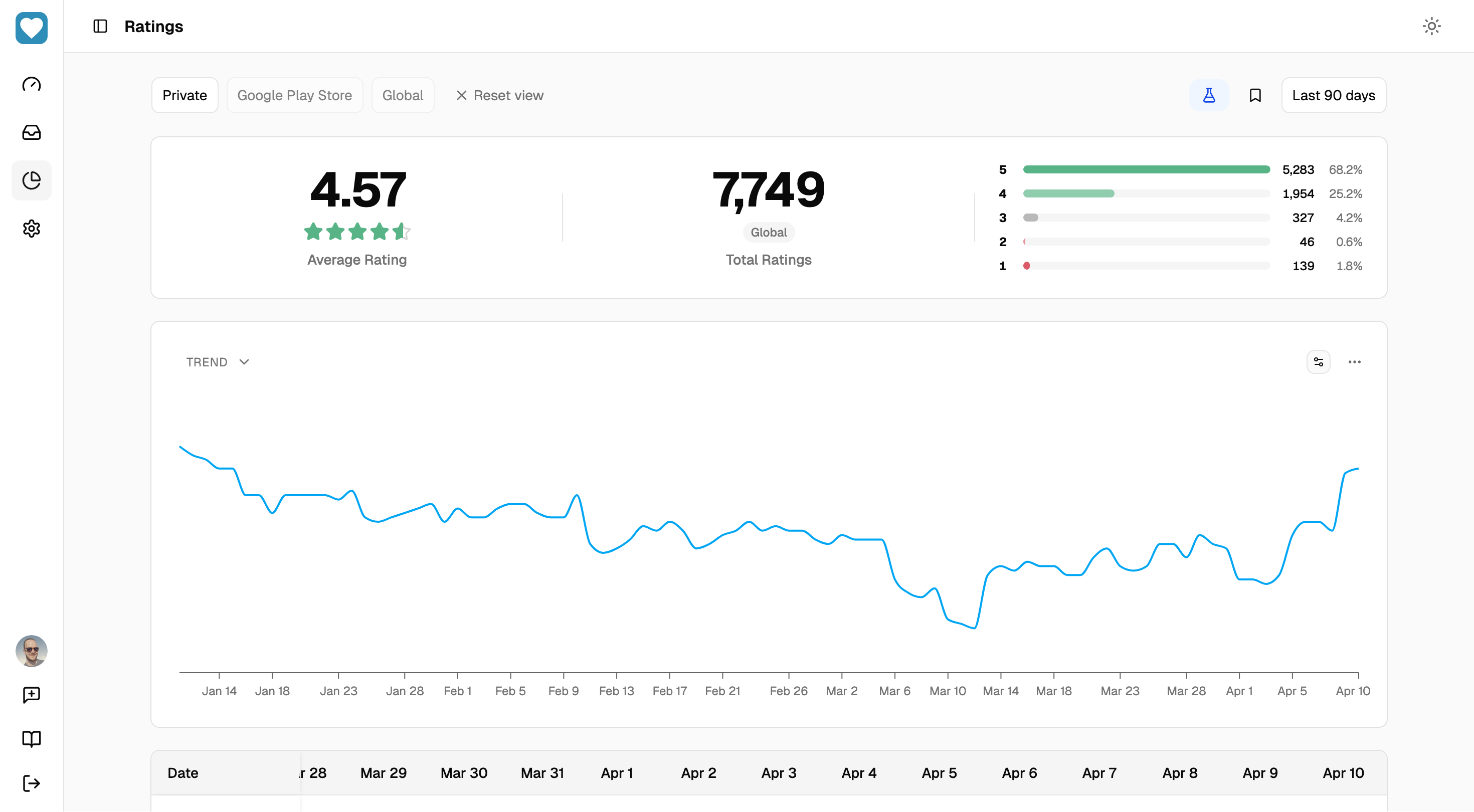
Understanding the Data
Rewo processes rating data differently depending on the store provider and the available data source (public or private). These technical differences determine the level of detail, historical depth, and granularity available in your charts.
Google Play Store — Public Data
This data source reflects the information exactly as it appears to users on the Google Play Store storefront. While it provides country-specific ratings, the rating count remains a global total (an aggregate of all ratings and reviews combined).
Note that these country-specific ratings are not simple arithmetic averages; Google uses a proprietary calculation that weights recent ratings more heavily. For the star distribution (histogram), Google Play provides relative values rather than absolute counts.
Since this data is retrieved directly from the public storefront, Rewo can only provide historical tracking from the moment you set up the Google Play Store provider.
Google Play Store — Private Data (Archive files)
This data source is exclusively global and does not provide country-specific granularity. However, it offers access to the entire rating history of your app.
Unlike the public storefront, these archive files contain raw data without any pre-applied weighting or proprietary calculations. This enables Rewo to derive precise rolling averages (e.g., 3, 7, 14, or 30 days) and identify long-term trends.
Because these averages are calculated from a complete historical dataset rather than Google's weighted storefront algorithm, they will deviate from the ratings visible on the public store. While this data stream is subject to a multi-day processing delay from Google, it provides the most comprehensive dataset for long-term tracking.
Setting this up requires a one-time configuration of your Google Cloud project and bucket—see our Google Play Store Integration guide for details.
Apple App Store — Public Data
This data source reflects the information exactly as it appears to users on the Apple App Store storefront. It provides both country-specific ratings and rating counts, provided a minimum threshold of ratings has been met.
Unlike Google Play, the App Store provides a more granular dataset including absolute counts for each star level in the histogram. This allows Rewo to track rating volume and distribution changes for individual countries.
Since this data is retrieved directly from the public storefront, Rewo can only provide historical tracking from the moment you set up the Apple App Store provider.
Data Source Comparison
| Feature | Google Play (Public) | Google Play (Private) | Apple App Store (Public) |
|---|---|---|---|
| Scope | Country | Global | Country |
| Rating Count | Global Aggregate (Ratings + Reviews) | Global Aggregate (Ratings) | Country-based (Ratings+ Reviews) |
| Histogram Type | Relative only | Absolute & Relative | Absolute & Relative |
| Historical Range | Since Provider Setup | Full Lifetime History | Since Provider Setup |
| Sync Frequency | Once Per Day | Once Per Day | Once Per Day |
| Data Delay | No delay (Current Store state) | Up to a few days | No delay (Current Store state) |
| Calculation Basis | Store-Front Average | Lifetime / Moving Averages | Store-Front Average |
Working with the Charts
The ratings dashboard provides several tools to visualize and refine your data analysis.
Main Filters
The filter bar at the top of the page controls the primary data context:
- Platform & Source: Switch between Apple App Store/Google Play Store and Public/Private data streams.
- Country: Filter by region/country to analyze localized performance.
- Date Range: Define the time period for your analysis.
By default, Rewo displays public storefront data for the US Google Play Store.
Chart Types
Three primary views allow you to analyze ratings and growth from different angles:
- Trend: Tracks the average rating over time to monitor overall satisfaction.
- Volume: Displays the total count of ratings, useful for measuring the impact of marketing activities or seasonal spikes.
- Breakdown: Provides a stacked distribution of star ratings (1-5 stars) to see how your rating mix is evolving.
When using Private Google Play Store data, we recommend applying an Average Period (e.g., 30 days) via the options menu. Because private data includes the entire app history, the long-term average naturally converges over time and may mask recent fluctuations.
Chart Customization & Controls
Fine-tune your visualizations using the following controls:
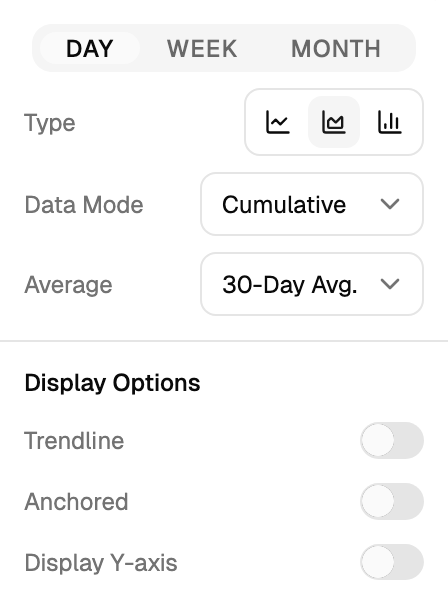
- Aggregation: Group data by Day, Week, or Month to identify patterns or smooth out daily noise.
- Chart Style: Switch between line, area, and stacked bar charts. For breakdown charts, you can also use 100% stacked bars to focus on relative distribution.
- Data Mode: Choose between Cumulative (total history up to each point) or Periodic (changes occurring specifically within each aggregation interval).
- Average Period: Apply a rolling average (3, 7, 14, or 30 days) or a long-term average to the data. Note: This control is available when using Cumulative mode. Selecting 0 days disables the rolling average, effectively showing the periodic data for that specific interval.
Display Options:
- Trendline: Overlay a linear regression to identify the general direction of your ratings.
- Anchored: When enabled, the Trend chart fixes the y-axis from 1 to 5 stars, while the Volume chart anchors its axis to zero for a consistent scale.
- Show y-axis: Toggle the visibility of the vertical axis values.